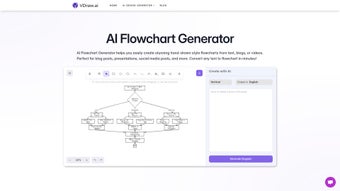

Download Vdraws AI Flowchart Generator – Free Hand-Drawn Flowchart Tool for Windows, Mac, Android & iOS
Transform your ideas into engaging, hand-drawn style flowcharts with Vdraws AI Flowchart Generator—a powerful, web-based tool that turns text into visually striking diagrams in seconds. Whether you're summarizing a blog post, planning a project, or preparing a presentation, Vdraws simplifies complex concepts with creative, human-like sketches. This free AI-powered software is compatible with Windows, Mac, Android, and iOS, offering seamless access across devices.
With intuitive input and smart customization, Vdraws makes visual storytelling effortless. No design experience required—just type your content and watch your ideas come to life in a unique, hand-crafted aesthetic. Perfect for educators, entrepreneurs, students, and creatives, Vdraws elevates content clarity and audience engagement.
Key Features of Vdraws AI Flowchart Generator
One of the standout features of Vdraws AI Flowchart Generator is its ability to convert plain text into visually compelling, hand-drawn flowcharts with minimal user input. Unlike traditional diagramming tools that require dragging and dropping shapes, Vdraws leverages advanced AI algorithms to analyze your content and automatically generate a flowchart that reflects the logical structure of your text. Whether you’re pasting a paragraph from a blog post, a meeting transcript, or a social media thread, the AI intelligently identifies key concepts, decision points, and relationships to build a coherent visual map.
Another powerful feature is the hand-drawn aesthetic, which gives each flowchart a unique, organic feel. This design choice sets Vdraws apart from standard digital diagrams that often look sterile or overly polished. The slight imperfections in lines and handwriting-like elements add warmth and personality, making the flowcharts ideal for creative presentations, educational materials, and social media content. Users can further personalize their diagrams by adjusting text size, symbol style, and color themes, ensuring brand consistency or personal flair.
Additionally, Vdraws supports multiple input formats, including plain text, bullet points, and structured outlines. This flexibility allows users to work with content in whatever form it exists. The tool also offers export options in PNG, SVG, and PDF formats, making it easy to embed visuals into reports, slides, or websites. With real-time preview and instant updates, users can tweak their content and see immediate changes—streamlining the entire design process. For teams collaborating remotely, the ability to share generated flowcharts via link ensures smooth workflow integration.
How to Use Vdraws AI Flowchart Generator – Step-by-Step Guide
Using Vdraws AI Flowchart Generator is designed to be as simple as possible, ensuring even non-technical users can create professional-looking diagrams in minutes. The process begins with visiting the official website and accessing the web-based tool—no installation required. This makes it accessible from any device with an internet connection, whether you're using a Windows PC, Mac, tablet, or smartphone.
Step 1: Input Your Text – Copy and paste your content into the designated text box. This can be a paragraph from a blog, a project plan, a meeting summary, or even a social media post. The AI is trained to understand context and structure, so it will automatically detect main ideas, subpoints, and decision branches.
Step 2: Customize the Output – Once the flowchart appears, you can fine-tune it using the intuitive editing panel. Adjust text font, line thickness, symbol types (like circles, rectangles, or arrows), and color schemes. You can also reposition nodes or add annotations to clarify complex sections.
Step 3: Export & Share – After finalizing your diagram, click the export button to save your flowchart in PNG, SVG, or PDF format. These formats are ideal for use in PowerPoint, Google Slides, websites, or print. You can also generate a shareable link to send directly to team members or clients, enabling collaborative feedback without file transfers.
For advanced users, Vdraws supports batch processing for multiple inputs and integrates with cloud storage platforms like Google Drive and Dropbox. This allows you to import content directly from your files and export results back to your preferred location. The tool also includes a history feature, so you can revisit past projects and make updates as needed.
Compatibility & System Requirements
Vdraws AI Flowchart Generator is a web-based application, meaning it runs entirely in your browser—there’s no need to download or install software on your device. This makes it compatible with virtually any operating system, including Windows 10 and later, macOS 10.15 and above, Android 8.0+, and iOS 14+. Whether you're using a desktop, laptop, tablet, or smartphone, you can access Vdraws anytime, anywhere.
The only system requirement is a stable internet connection and a modern web browser such as Chrome, Firefox, Safari, or Edge. The tool is optimized for performance, ensuring smooth rendering even with complex diagrams. It also supports touchscreens, making it ideal for use on iPads and Android tablets with stylus input.
Because Vdraws operates in the cloud, it automatically updates with the latest features and security patches—there’s no need to manually check for updates. This ensures you always have access to the most advanced AI capabilities and bug fixes. Additionally, all data is encrypted during transmission, and your content is not stored on servers unless you choose to save it to your account. This commitment to privacy makes Vdraws a secure choice for both personal and professional use.
Pros and Cons of Vdraws AI Flowchart Generator
- Pros:
- Instantly converts text into unique hand-drawn flowcharts with minimal effort.
- Intuitive web interface works across Windows, Mac, Android, and iOS devices.
- Highly customizable with color, font, symbol, and layout options.
- Supports multiple input formats and export to PNG, SVG, and PDF.
- Free to use with no hidden fees or subscription traps.
- Cloud-based with automatic updates and strong data security.
- Perfect for educators, marketers, and remote teams needing visual clarity.
- Cons:
- Requires an internet connection to use (offline mode not available).
- Advanced customization may require a learning curve for new users.
- Hand-drawn style may not suit formal or corporate branding in all cases.
- Large, complex diagrams can slow down rendering on older devices.
- No native desktop app for Windows or Mac (only web-based).
Frequently Asked Questions (FAQ)
Is Vdraws AI Flowchart Generator free to use?
Yes, Vdraws offers a fully functional free version that allows unlimited flowchart generation with no time limits or watermarks. You can create, edit, and export diagrams at no cost.
Can I use Vdraws on my mobile device?
Absolutely. Vdraws is a responsive web app, so it works seamlessly on Android and iOS devices. You can access it via your mobile browser and even use a stylus for sketch-like input on tablets.
Does Vdraws support offline usage?
Currently, Vdraws requires an active internet connection to function, as it runs entirely in the cloud. However, future updates may introduce limited offline capabilities.
How secure is my data when using Vdraws?
Your content is encrypted during transmission and is not stored on servers unless you explicitly save it to your account. Vdraws prioritizes user privacy and does not share data with third parties.
Can I export my flowcharts for use in presentations?
Yes, Vdraws allows export in PNG, SVG, and PDF formats—perfect for PowerPoint, Google Slides, websites, or print. The high-resolution output ensures crisp visuals in any setting.
Conclusion: Why You Should Download Vdraws AI Flowchart Generator Today
If you're looking for a fast, creative, and user-friendly way to visualize ideas, Vdraws AI Flowchart Generator is one of the best tools available today. Its ability to transform text into hand-drawn flowcharts with just a few clicks makes it ideal for students, educators, entrepreneurs, and content creators. Whether you're simplifying a complex process, summarizing a blog, or planning a project, Vdraws helps you communicate more clearly and engagingly.
With full compatibility across Windows, Mac, Android, and iOS, and no installation required, Vdraws is accessible from any device. The free tier offers robust functionality, while the secure, cloud-based architecture ensures your work is always safe and up to date. Although it lacks offline support and a native desktop app, the benefits far outweigh the limitations for most users.
Don’t miss out on the power of visual storytelling. Download Vdraws AI Flowchart Generator now and turn your ideas into captivating, hand-crafted diagrams that stand out.



.png)



